 AICore Docs
图像API接口
Image-to-image (以图生图)
基于输入图像生成相似或变体图像的API接口,基于先进的AI模型,能够根据输入的参考图像生成风格相似或内容变体的新图像,适合创意设计和图像迭代需求
基本信息
POSTEndpoint
/v1/chat/completions模型名称:gemini-3.1-flash-image-preview
请求参数
| 路径 | 参数 | 类型 | 必填 | 说明 | 默认 |
|---|---|---|---|---|---|
| - | model | string | 是 | 模型名称,固定为 gemini-3.1-flash-image-preview | - |
| - | messages | array | 是 | 消息数组,包含用户输入的文本和图片 | - |
| - | n | integer | 否 | 生成图片数量。传 2、3 等值时可一次返回多张变体图 | 1 |
messages[] | role | string | 是 | 消息角色,固定为 user | - |
messages[] | content | array | 是 | 内容数组,包含文本和图片元素 | - |
content[] | type | string | 是 | 内容类型:text 或 image_url | - |
content[] | text | string | 否 | 当 type 为 text 时的文本内容 | - |
content[] | image_url | object | 否 | 当 type 为 image_url 时的图片对象 | - |
image_url | url | string | 是 | 图片的URL地址(当type为image_url时必填) | - |
注意:
- image-to-image 模型需要一个参考图片和可选的文本描述来生成变体图片。
- 可通过
n参数一次生成多张变体图,返回结果会出现在choices数组中。 - 默认会保持输出图片与输入图片尺寸一致;若未提供输入图片,则生成 1:1 的方图。
- 若需指定宽高比,可通过
extra_body.google.image_config.aspect_ratio选择以下预设值。 - 若需指定输出清晰度,可通过
extra_body.google.image_config.image_size设置,支持范围见下表,建议使用大写。
| 宽高比 | 分辨率 |
|---|---|
| 1:1 | 1024x1024 |
| 2:3 | 832x1248 |
| 3:2 | 1248x832 |
| 3:4 | 864x1184 |
| 4:3 | 1184x864 |
| 4:5 | 896x1152 |
| 5:4 | 1152x896 |
| 9:16 | 768x1344 |
| 16:9 | 1344x768 |
| 21:9 | 1536x672 |
| 模型 | image_size 支持值 |
|---|---|
gemini-3-pro-image-preview | 1K、2K、4K |
gemini-3.1-flash-image-preview | 512、1K、2K、4K |
请求示例
curl https://api.xty.app/v1/chat/completions \
  -H "Content-Type: application/json" \
  -H "Authorization: Bearer sk-xxxxx" \
  -d '{
    "model": "gemini-3.1-flash-image-preview",
    "n": 2,
    "messages": [
      {
        "role": "user",
        "content": [
          {"type": "text", "text": "基于这张图片生成一个卡通风格的变体,保持主要元素但改变艺术风格"},
          {
            "type": "image_url",
            "image_url": {
              "url": "https://example.com/reference-image.jpg"
            }
          }
        ]
      }
    ],
    "extra_body": {
      "google": {
        "image_config": {
          "aspect_ratio": "16:9",
          "image_size": "2K"
        }
      }
    }
  }'
import requests
import json
url = "https://api.xty.app/v1/chat/completions"
headers = {
"Content-Type": "application/json",
"Authorization": "Bearer sk-xxxxx"
}
data = {
"model": "gemini-3.1-flash-image-preview",
"n": 2,
"messages": [
{
"role": "user",
"content": [
{"type": "text", "text": "基于这张图片生成一个卡通风格的变体,保持主要元素但改变艺术风格"},
{
"type": "image_url",
"image_url": {
"url": "https://example.com/reference-image.jpg"
}
}
]
}
],
"extra_body": {
"google": {
"image_config": {
"aspect_ratio": "16:9",
"image_size": "2K"
}
}
}
}
response = requests.post(url, headers=headers, data=json.dumps(data))
print(response.json())from openai import OpenAI
import httpx
client = OpenAI(
base_url="https://api.xty.app/v1",
api_key="sk-xxxxx",
http_client=httpx.Client(
base_url="https://api.xty.app/v1",
follow_redirects=True,
),
)
response = client.chat.completions.create(
model="gemini-3.1-flash-image-preview",
n=2,
messages=[
{
"role": "user",
"content": [
{"type": "text", "text": "基于这张图片生成一个卡通风格的变体,保持主要元素但改变艺术风格"},
{
"type": "image_url",
"image_url": {
"url": "https://example.com/reference-image.jpg"
}
}
]
}
],
extra_body={
"extra_body": {
"google": {
"image_config": {
"aspect_ratio": "16:9",
"image_size": "2K"
}
}
}
}
)
print(response)fetch('https://api.xty.app/v1/chat/completions', {
method: 'POST',
headers: {
'Content-Type': 'application/json',
'Authorization': 'Bearer sk-xxxxx'
},
body: JSON.stringify({
model: "gemini-3.1-flash-image-preview",
n: 2,
messages: [
{
role: "user",
content: [
{type: "text", text: "基于这张图片生成一个卡通风格的变体,保持主要元素但改变艺术风格"},
{
type: "image_url",
image_url: {
url: "https://example.com/reference-image.jpg"
}
}
]
}
],
extra_body: {
google: {
image_config: {
aspect_ratio: "16:9",
image_size: "2K"
}
}
}
})
})
.then(response => response.json())
.then(data => console.log(data));响应示例
成功响应
{
"id": "gemini-1704067200000",
"object": "chat.completion",
"created": 1704067200,
"model": "gemini-3.1-flash-image-preview",
"choices": [
{
"index": 0,
"finish_reason": "stop",
"message": {
"role": "assistant",
"content": "这是第 1 张变体图:"
}
},
{
"index": 1,
"finish_reason": "stop",
"message": {
"role": "assistant",
"content": "这是第 2 张变体图:"
}
}
],
"usage": {
"prompt_tokens": 0,
"completion_tokens": 0,
"total_tokens": 0
}
}错误响应
{
  "error": {
    "message": "请求失败",
    "type": "invalid_request_error",
    "param": null,
    "code": null
  }
}
效果展示
输入示例
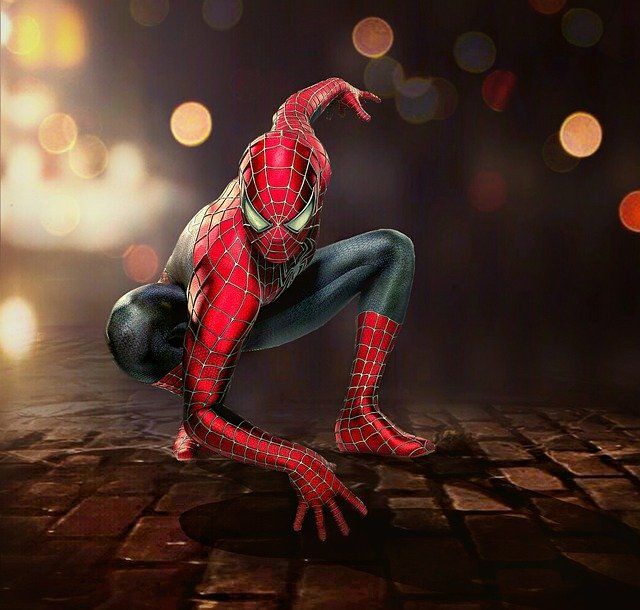
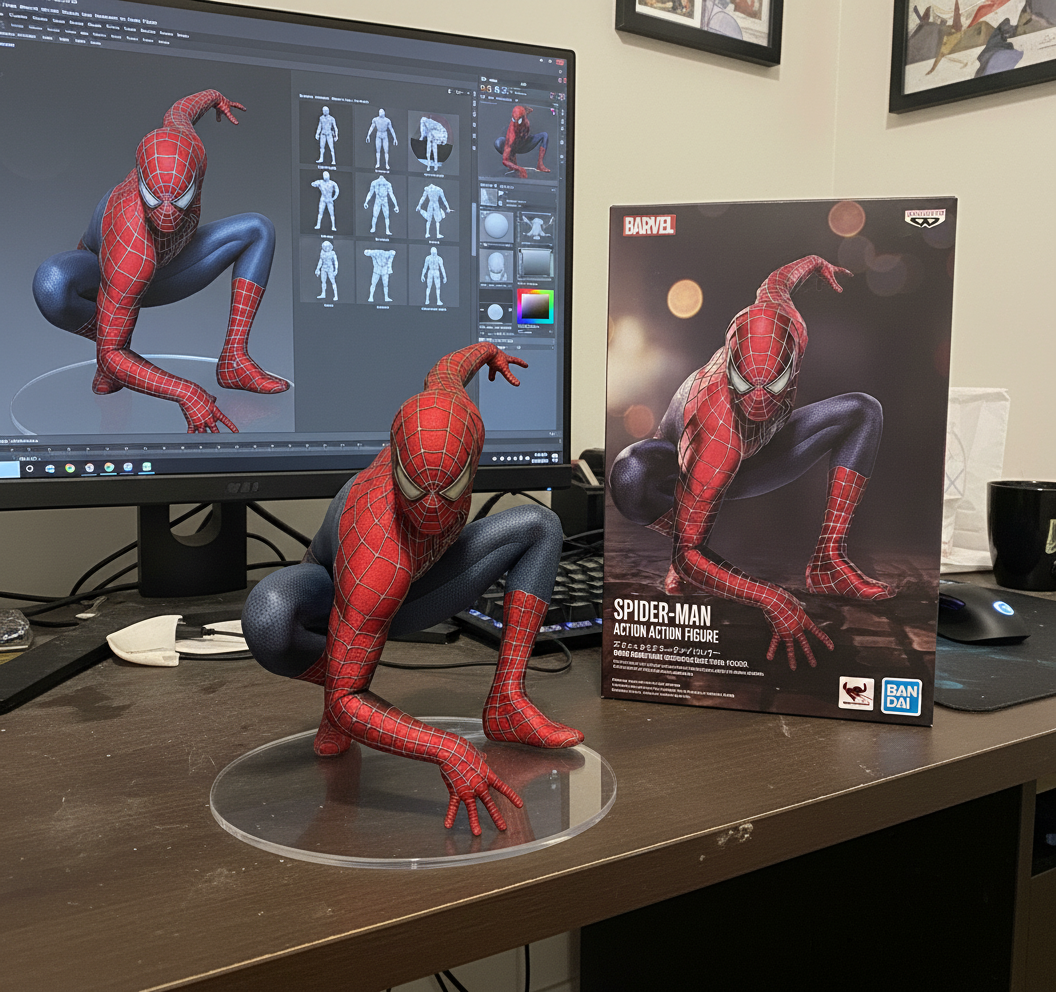
输入文字(中文版):使用提供的图片来制作插画角色的 1/7 比例商业化手办,并以写实的风格与环境呈现。 将手办放置在一张电脑桌上,使用 无文字的圆形透明亚克力底座。 在电脑屏幕上,显示该手办在 ZBrush 中的建模过程。 在电脑屏幕旁边,放置一个 BANDAI 风格的玩具包装盒,包装盒上印有原始插画。
输入文字(英文版):Use the provided images to create a 1/7-scale commercial figure of the character from the illustration, presented in a realistic style and environment. Place the figure on a computer desk, using a circular transparent acrylic base with no text. On the computer screen, display the figure’s modeling process in ZBrush. Beside the computer screen, place a BANDAI-style toy packaging box printed with the original illustration.
输入图片:
输出结果
输出图片:
使用技巧
文本描述优化
- 具体指导:提供具体的风格转换指导
- 保持元素:明确哪些元素需要保留
- 变化程度:描述期望的变化程度
最佳实践
- 高质量输入:使用清晰、高质量的参考图片
- 明确描述:提供清晰、具体的文本描述
- 风格一致:保持整体风格的一致性
- 多图筛选:需要多个变体方案时可设置
n > 1,一次返回多张结果进行挑选
注意事项
- 图片要求:必须提供清晰的参考图片
- 版权意识:确保输入图片的使用权限
- 图片格式:支持通过URL和base64提供的图片,格式包括 JPEG、PNG、WebP 等
- 文件大小:建议每张图片不超过 10MB
- 处理时间:根据图片复杂度,处理时间在5-15秒之间
- URL有效期:返回的图像URL地址有效期为1个小时,请及时保存或下载
- 返回结构:当设置
n > 1时,会返回多个choices,每个choice对应一张生成图片